Documentation · Sprint boards
How sprint boards and backlog planning work in SPIREX
A sprint board in SPIREX is not a kanban board with a timer attached. The sprint is a real object with a start, an end, and a defined outcome. This page documents the actual mechanics: how work moves from backlog to sprint to done, and what happens to the work that does not make it.
By the SPIREX team · Published
The three places work lives: backlog, sprint, board
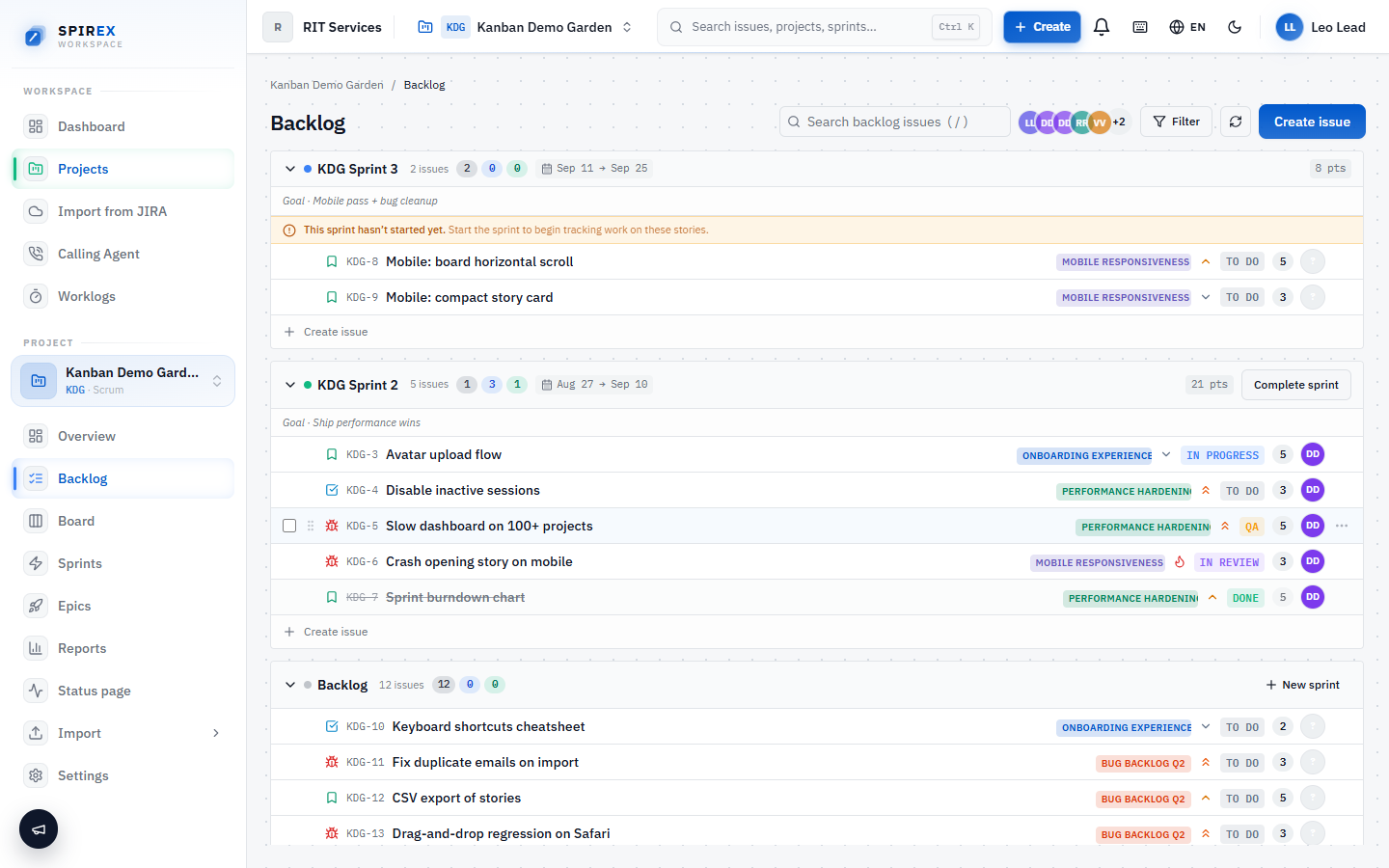
Every story starts in the backlog, a ranked list, ordered by drag-and-drop, that represents "everything the project might do, in the order we would do it." Nothing in the backlog is scheduled yet.
Planning a sprint means pulling a set of backlog items into it before it starts. Once a sprint is started, the board becomes the working surface: the same stories, now organised into the workflow columns the project actually uses instead of a flat list.
Setting up a sprint
A sprint is created with a name and, optionally, start and end dates. SPIREX does not force a fixed two-week cadence; a project can run sprints of whatever length fits the team. Stories are added to it from the backlog before or after it starts.
Starting a sprint is a deliberate action, not an automatic transition. Nothing moves onto the active board until someone actually starts the sprint that contains it.
Working the board
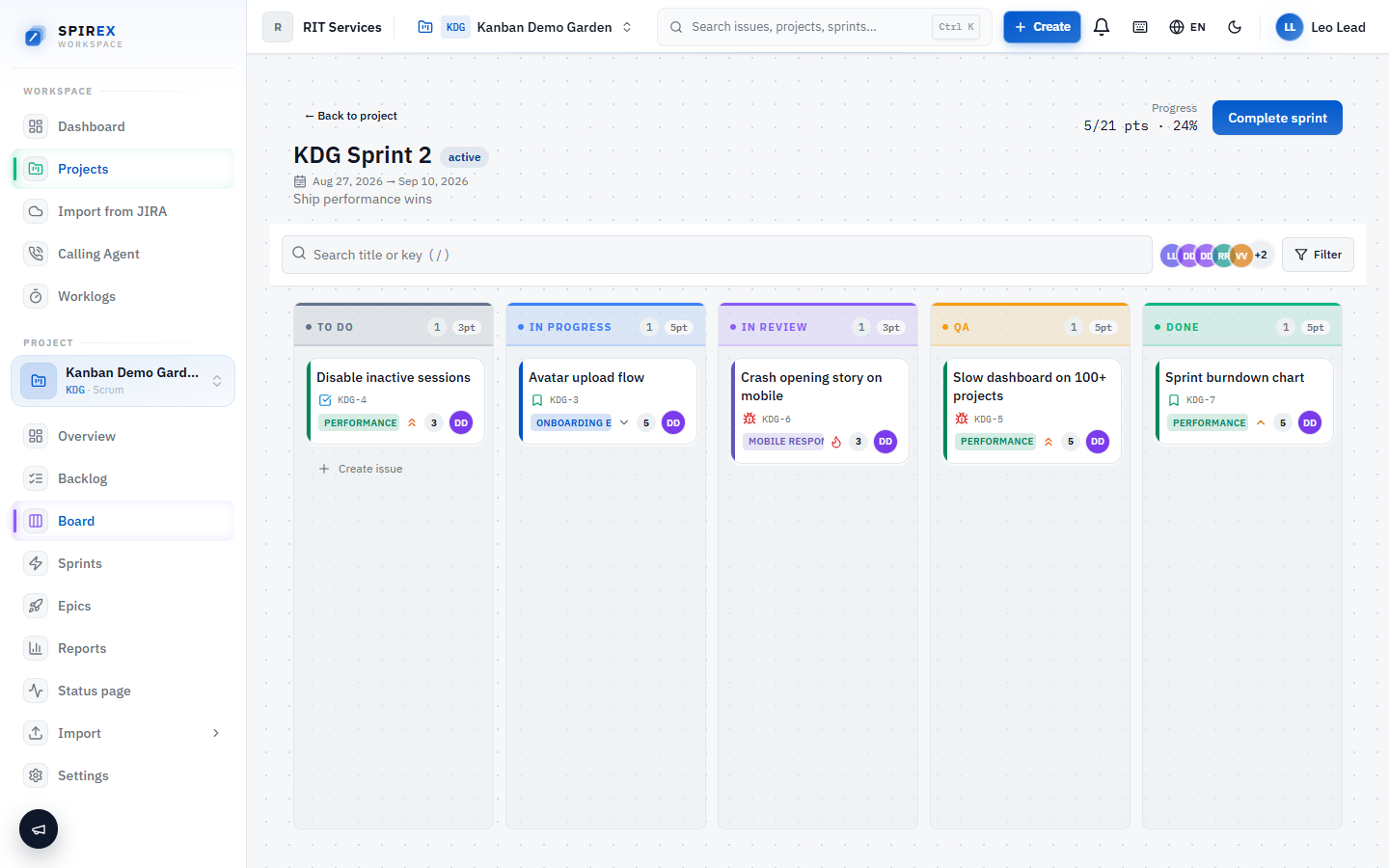
The board is drag-and-drop, and its columns are not fixed: they come from the project's own custom workflow, so a board can have three columns or nine depending on how the team actually works. Card moves are optimistic: the board updates immediately and reconciles with the server in the background, rather than freezing while a request completes.
Within a column, cards can be manually reordered by dragging, and that order persists, which is useful for signalling "this is next" independently of status. Each card surfaces story points, assignee, priority, issue type, labels and the parent epic without opening it.
- Columns are driven by the project's custom workflow, not a fixed template.
- Manual rank ordering within a column persists across reloads.
- Moving a parent story to a "done"-mapped column warns if its subtasks are still open, instead of silently closing an incomplete story.
- Issues can be linked to one another (blocks, relates to, duplicates) so dependencies are visible on the board, not discovered mid-sprint.
Grooming the backlog
Backlog grooming happens directly in the ranked list: reorder by dragging, and create new issues inline without leaving the page for a dialog on every row. The same optimistic-update behaviour applies here, so grooming a long backlog does not feel like filling out forms one at a time.
Work is organised as epics, stories and subtasks, each carrying story points and labels, the units a sprint is actually planned around.
Closing a sprint without losing unfinished work
Completing a sprint is itself a workflow step, not a delete action. SPIREX asks what should happen to whatever is still open, and incomplete issues can be moved into a new sprint created as part of the same action. Carry-over is one step, not a manual re-triage of every leftover card.
Frequently asked questions
That depends on whether sprint-based scrum is actually how your team works. SPIREX models the sprint as a real object with a lifecycle (planned, started, completed, carried over) rather than a label on a kanban column, which is a genuine differentiator for scrum teams specifically. If your team runs continuous-flow kanban instead, SPIREX is not the right fit today. See "Honest scope" on the open-source scrum tool page.
A kanban board is a snapshot of statuses with no concept of a sprint. SPIREX's board is one view onto a sprint that has a start, an end, and a completion step that explicitly asks what happens to unfinished work. The columns themselves are still fully customisable, so the board looks like a kanban board. The difference is what sits underneath it.
Yes. Columns come from the project's custom workflow, which is editable independently of any single sprint. Renaming a status propagates to the board, the backlog and the activity history at once, so historical records still read correctly afterward.
Completing the sprint prompts for what to do with incomplete issues. The common choice is carrying them into a new sprint, which SPIREX creates as part of the same completion action rather than requiring a separate step.
Yes. Stories carry story points and labels in the backlog and on the board, and sprint-health reporting is built from the same figures. See the time tracking and reporting documentation.
See the board with your own data
Create a free workspace, import a Jira project or start clean, and run one sprint end to end: plan it, work it, close it, and watch the carry-over step handle what is left.